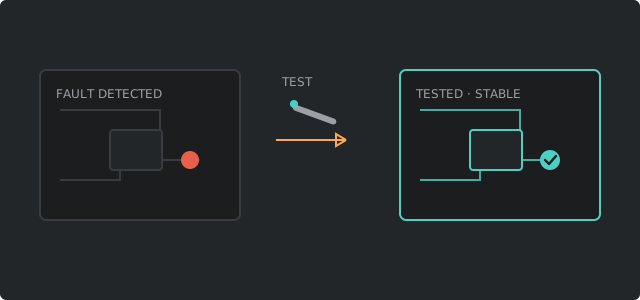
Illustration of the diagnostic-to-fix flow: a faulty board with a fault marker, a probe testing it, and the same board cleared to a stable state.
Nothing gets swapped on a hunch - every fix is verified against the original fault before it's called done.
HW-01

Diagnostics & repair

Won't power on, random shutdowns, overheating, failing fans, dead batteries. We test components individually, not by guessing and swapping parts.

HW-02

Screen & component replacement

Cracked laptop screens, dead keyboards, failing trackpads, ports that no longer charge or connect.

HW-03

Builds & upgrades

Custom desktop builds, RAM and storage upgrades, GPU swaps, and thermal work for machines that run hot under load.

SEC-01

Malware & virus removal

Pop-ups, hijacked browsers, fake antivirus alerts, and slow machines that are actually infected, not just old.

SEC-02

Ransomware & incident triage

If something has already gone wrong, we assess what's actually encrypted or compromised before recommending next steps.

SEC-03

Hardening & lockdown

Account security, update policies, and basic hygiene so the same problem doesn't come back in three months.

SEC-04

Hardware keys & phishing-resistant login

FIDO2 / passkey enrollment, MFA that stops phishing, and Swissbit iShield Key 2 setup for people and small teams who are done with SMS codes.

NET-01

Wi-Fi & coverage

Dead zones, dropped connections, and router placement that's been fighting your house's layout since day one.

NET-02

Home & small-business networks

Wired runs, switches, access points, and networks built for people who want more control than a stock router gives them.

SW-01

Operating system issues

Won't boot, blue screens, update loops, and driver conflicts - fixed without wiping your files unless that's truly the only option.

SW-02

Clean installs & migrations

Fresh OS installs and moving everything over to a new drive or machine without losing settings you'd have to redo by hand.

DATA-01

Data recovery

Failing or dead drives, accidental deletion, corrupted partitions. We give you an honest read on what's recoverable before any work begins.

SUP-01

Remote support

Software issues, configuration, and walkthroughs handled live over a remote session - no drop-off required.

How work is scoped

What each category actually means on the bench.

Hardware diagnostics & component repair

Power issues, random restarts, overheating, dead batteries, cracked screens, and ports that no longer charge or transfer data. We test power delivery, storage health, memory, and thermal behavior before recommending a part. Laptop screen and keyboard jobs include a careful teardown so flex cables and adhesives are not sacrificed for speed. Desktop builds and upgrades cover RAM, NVMe/SSD installs, GPU swaps, and cleaning that restores airflow when dust has cooked the machine for years.

Security: malware, ransomware triage, hardening

Pop-ups, browser hijacks, fake antivirus scareware, crypto-miners, and ransomware are handled as security incidents, not “cleanup packages.” We identify what is present, remove it with layered tools, reset compromised accounts when needed, and close the hole that let it in - weak passwords, outdated software, risky browser extensions, or missing backups. Active ransomware gets an honest triage: what is encrypted, whether offline backups exist, and whether recovery or a controlled rebuild is the safer path.

Networking for homes and small shops

Wi‑Fi dead zones, intermittent drops, double-NAT from stacked routers, and networks that grew by plugging in whatever was cheapest. We map coverage, place access points where walls and floors actually allow signal, separate guest traffic when it matters, and document the SSID, admin password, and layout so the next person is not starting from scratch. Wired runs and small switch installs are available when wireless will never be stable enough for cameras, POS, or heavy file shares.

Operating systems, migrations, and data recovery

Boot loops, blue screens, driver conflicts, and update failures are repaired without a wipe whenever the disk and Windows install can be saved. When a clean install is the right call, we migrate documents, photos, browser data, and licensed software where licenses allow. Data recovery starts with a risk assessment: if the drive is clicking or showing failing SMART attributes, we prioritize imaging over casual repair so the remaining readable sectors are not spent on guesswork.

Remote support

Software configuration, printer drivers, email clients, and many malware cases can be handled over a supervised remote session. You stay in control of the machine; we only connect after you approve and can end the session any time. Hardware failures still need the bench.

Not sure which ticket type fits? Describe symptoms on the contact form - slow, no power, no internet, strange pop-ups - and we will map it to the right service before you drop anything off. Free background reading lives in our guides.

Mission profile

We do not “try a few things.” We fly a procedure.

Every engagement has a pad, a trajectory, and abort criteria. Intake captures symptoms and constraints. Diagnostics produce a fault tree, not a shopping list. The quote is the flight plan you sign. Execution is controlled: one variable at a time when the system is unstable, broader parallel work when the risk is low. Closeout is a debrief - what failed, what changed, what to monitor - so you are not flying blind after pickup.

Hardware without software context is incomplete. Software without hardware telemetry is guessing. Networks without physical placement are PowerPoint. We treat the whole system as one vehicle: power delivery, thermal envelope, storage integrity, OS state, identity, and the path packets take through your building. That is how intermittent faults stop being “ghosts” and start being tickets that close.

If a job needs a clean-room lab, an OEM channel, or a specialist we are not, we scrub and redirect. Pride is not a spare part. Getting your data and uptime restored is the only scoreboard that matters.

Partner stack · Security hardware

Swissbit iShield Key 2 - B2B, on the bench.

CCPCREPAIR maintains a business relationship with Swissbit for the iShield Key 2 series - industrial-grade FIDO2 authenticators built for phishing-resistant sign-in. That is not a sticker on the door. We use the same class of hardware we recommend: enroll keys, register passkeys on the accounts that matter, and design small-business MFA that does not depend on a text message a criminal can intercept.

Typical jobs: issue or enroll hardware keys for owners and staff, replace weak “authenticator app only” setups, lock admin portals (Microsoft 365, Google Workspace, password managers, VPN, Git, hosting) to something you have to physically touch, and document which keys belong to which people so offboarding is not a mystery.

Enterprise-style deployments can restrict registration to known device classes. Our iShield Key 2 line carries AAGUID 7787a482-13e8-4784-8a06-c7ed49a7aaf4 - useful when you want only company-issued keys on the allow-list, not every USB stick on Amazon.

Not a gadget storefront. We scope the security outcome first (which accounts, which users, recovery path if a key is lost). Hardware is a tool in that plan - quoted flat when the path is clear. Read the field notes in hardware keys & FIDO2 or start a ticket.

  • Swissbit B2B · iShield Key 2
  • FIDO2 / WebAuthn / passkeys
  • Phishing-resistant MFA design
  • Admin & owner account lockdown
  • Allow-list ready (model AAGUID)
  • Paired with malware hardening when needed

Not sure which subsystem? Downlink the symptoms - we will map the stack.